Posts

Showing posts with the label site

Block a site on all browsers in Linux
Image
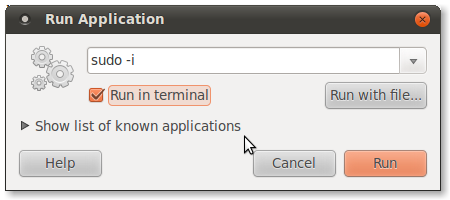
Block a site on all browsers in Linux This tutorial will help you to block a site in all browsers on Linux Open Terminal ( ALT+F2 ). Type sudo -i  in the input field as shown in the picture above. Check the Run in terminal option. Finally click Run button. Type your password if necessary and press enter. Then enter the following commands. gedit /etc/hosts You will get Gedit Text Editor  window. For Example we need to block  Facebook a dd the following lines just after 127.0.0.1 localhost 0.0.0.1         facebook.com 0.0.0.1         www.facebook.com  Thats it. When you now open www.facebook.com or facebook.com  You cannot access it. In Google Chrome  you will get this page. To enable back Facebook remove the lines we added from the file  /etc/hosts . 0.0.0.1         facebook.com 0.0.0.1         www.facebook.com

Block a site on your PC

Block a site on your PC Are you trying to block a website on your PC? You need not setup firewall filters to do this. Here is a simple trick to block the site on your system. Although many of you know this, this is for the unknown.... First of all I need to describe about the "Hosts" file It is a file located in C:WINDOWSsystem32driversetc , and it contains information about the hosts on your system... Here are the steps 1. Go to the location C:WINDOWSsystem32driversetc 2. You will find a file by name "hosts" with no extension. 3. Open that file in "Notepad" 4. Go to the bottom of the page where you could find the following line "127.0.0.1 localhost" 5. Now add another line at the bottom for ex: "127.0.0.1 http://www.xyz.com/ localhost" 6. This line will block the site http://www.xyz.com The trick behind this 127.0.0.1 is the IP address of local system the so called loop back address... Now when you enter a site the browser will first c...