Posts

Showing posts with the label block

Block or unblock any website from your computer

Block or unblock any website from your computer Do you wish to block or unblock any website from your computer? You can set your computer to open the sites that you wish and block the ones that you don�t want to. Here�s how you can block or unblock any website from your computer: 1.Open your C: folder. ( or Any drive where you have installed Windows) 2.Navigate to Windows folder and search for Systems32 folder inside it. 3.Find a folder �drivers� and then another folder etc inside it. 4.Now your full path should be C:WindowsSystem32driversetc 5.Inside the etc folder, look for a file named as hosts. 6.Open that hosts file with any text editor like Notepad or Wordpad 7.Scroll to the bottom and you can find a line there as 127.0.0.1 localhost. 8.Just below that line add this >> 127.0.0.2 (site name) 9.Now Save the file and exit. 10.You are done. To unblock the site: Simply go to hosts file and delete 127.0.02 (site name). You can now access the site from your computer.

Block Facebook any Website in your computer Without any Software

Image
Block Facebook any Website in your computer Without any Software If you want to block / restrict a certain website or several websites on your computer , just follow these steps . This trick is useful to block web sites you navigate to your children or anyone in your home or business computers. You can also lock the software to validate the product key or license information form from the website of the software. Now lets see how to block a website. Example : www.facebook.com Open My Computer and navigate to C : Windows System32 drivers etc Open the hosts file in Notepad (double click to open) Select Notepad in the Open With dialog box . Under the 127.0.0.1 localhost                                      :: 1 localhost Enter websites following format :...

Block User Pelanggan Internet dari IP Address List Dengan Firewall Filter

Image
Block User Pelanggan Internet dari IP Address List Dengan Firewall Filter Pada kasus pelanggan internet bulanan yang belum menggunakan session hotspot ataupun user manager pada mikrotik, maka untuk dapat memblockir akses internet pada user client, kita gunakan fasilitas firewall filter, biasanya cara ini digunakan untuk media pembelajaran tahap awal menganai Drop Ip Addrest-List . Cara paling simple ini memang biasanya dilakukan oleh admin mikrotik yang mempunyai resource router yang kecil, kenapa begitu ? karna dengan rule yang minimal tidak akan membuat over pada memory atau cpu di router board mikrotik yang dipakai. Untuk langsung mempraktekan caranya mari kita simak langkah-langkah berikut ini : Buat addrest list drop ip yang ingin dimasukan ke daftar block Buat Filrewall filter yang nanti kita arahkan ke daftar ip block Mode CLI /ip firewall address-list add address=192.168.100.2 list=drop add address=192.168.100.112 list=drop add address=192.168.100.111 list=drop add address=192....

Block Sites from Google’s Web Search Results

Image
Block Sites from Google’s Web Search Results Couple of days ago I wrote about how search results are becoming worse every time. This is because of all the spam around there that makes really difficult to show relevant results. The post also mentioned that human intervention is needed since sometimes an algorithm is not enough to filter real sources from spam. It seems that Google heard that because today they released a new Chrome extension which allows users to block sites from Googles web search results. The extension is really easy to use and the information collected from the users will be sent back to Google for further analysis and might help them improving their results and gives quality search results. The extension allows you to block and unblock sites and also edit your blocked site list by just pressing the extension icon. This is an experimental extension but it is really worth a try. We can help improving search results and stop spam and content farms.

Block a site on all browsers in Linux

Image
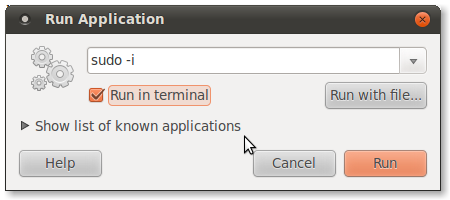
Block a site on all browsers in Linux This tutorial will help you to block a site in all browsers on Linux Open Terminal ( ALT+F2 ). Type sudo -i  in the input field as shown in the picture above. Check the Run in terminal option. Finally click Run button. Type your password if necessary and press enter. Then enter the following commands. gedit /etc/hosts You will get Gedit Text Editor  window. For Example we need to block  Facebook a dd the following lines just after 127.0.0.1 localhost 0.0.0.1         facebook.com 0.0.0.1         www.facebook.com  Thats it. When you now open www.facebook.com or facebook.com  You cannot access it. In Google Chrome  you will get this page. To enable back Facebook remove the lines we added from the file  /etc/hosts . 0.0.0.1         facebook.com 0.0.0.1         www.facebook.com

Block Mac dan IP Address Static Client Hotspot Mikrotik

Image
Block Mac dan IP Address Static Client Hotspot Mikrotik Untuk dapat mengunci client hotspot agar tidak bisa ganti-ganti IP Address maka kita perlu melakukan kunci mac address si client hotspot, rule ini dilakukan oleh owner hotspot yang masih menggunakan IP Static untuk memanajement hotspot mikrotiknya. Sebelum kita lanjut ke step-stepnya untuk mengetahui Mac Si Client kita kopi saja Mac si client dari IP -> ARP Berikut langkah-langkah yang harus kita lakukan pada mikrotik kita : Buat filter rule dengan klik ip -> firewall -> filter lalu input seperti gambar dibawah Klik Tab Advance lalu input seperti gambar dibawah : Lanjut pada menu tab Action kita pilih = Drop Mode CLI /ip firewall filter add action=drop chain=forward comment="Block IP MAC" src-address=!192.168.100.190 src-mac-address=D8:5D:4C:CF:2D:83 Copy - Paste di New Terminal Source/Reference : - http://mikrotik.co.id BACA JUGA : ARTIKEL TENTANG SETTING MIKROTIK DIBAWAH INI : 1. Tutorial Setting Mikrotik dari...

Block Kuzushi 2

Image
Block Kuzushi 2

Block a site on your PC

Block a site on your PC Are you trying to block a website on your PC? You need not setup firewall filters to do this. Here is a simple trick to block the site on your system. Although many of you know this, this is for the unknown.... First of all I need to describe about the "Hosts" file It is a file located in C:WINDOWSsystem32driversetc , and it contains information about the hosts on your system... Here are the steps 1. Go to the location C:WINDOWSsystem32driversetc 2. You will find a file by name "hosts" with no extension. 3. Open that file in "Notepad" 4. Go to the bottom of the page where you could find the following line "127.0.0.1 localhost" 5. Now add another line at the bottom for ex: "127.0.0.1 http://www.xyz.com/ localhost" 6. This line will block the site http://www.xyz.com The trick behind this 127.0.0.1 is the IP address of local system the so called loop back address... Now when you enter a site the browser will first c...

Block P2P Traffic on a Cisco IOS Router using NBAR

Block P2P Traffic on a Cisco IOS Router using NBAR In the following example, well use NBAR to block P2P traffic on our routers Gigabit interface. Create a class-map to match the protocols to be blocked. Create a policy-map to specify what should be done with the traffic. Apply the policy to the user-facing (incoming) interface. conf t !--- IP CEF should be enabled at first to block P2P traffic. !--- P2P traffic cannot be blocked when IPC CEF is disabled. ip cef ! !--- Configure the class map named p2p to match the P2P protocols !--- to be blocked with this class map p2p. class-map match-any p2p !--- Mention the P2P protocols to be blocked in order to block the !--- P2P traffic flow between the required networks. edonkey, !--- fasttrack, gnutella, kazaa2, skype are some of the P2P !--- protocols used for P2P traffic flow. This example !--- blocks these protocols. ! match protocol edonkey match protocol fasttrack match protocol gnutella match protocol kazaa2 match protocol winmx match pr...

Block Breaker Midnight Challenge Deluxe PC 2006

Image
Block Breaker Midnight Challenge Deluxe PC 2006 Block Breaker � um jogo no estilo arcade no qual voc� deve impulsionar uma bolinha para que ela acerte nos ret�ngulos coloridos que aparecem na parte de cima da tela. O desafio deste game � n�o deixar a bolinha sair do cen�rio. Para isso, voc� precisa controlar uma esteira que rebate a bola. Essa superf�cie fica na parte de baixo da tela, o �nico lado aberto. Caso a bolinha caia mais de tr�s vezes durante a mesma partida, voc� perde o jogo juntamente com todos os pontos conquistados na fase. Em meio aos ret�ngulos normais que voc� deve acertar, aparecem algumas caixas que liberam itens especais, como um aumento significante na pontua��o ou mais uma vida na partida. A fase s� � completada quando absolutamente todos os itens forem quebrados. A forma de comandar a esteira do jogo � feita pelo bot�o esquerdo do mouse ou pelas setas direcionais do teclado. Para dar in�cio � partida, basta clicar em qualquer parte da tela e a bolinha � impulsio...

Block ping request from a specific IP using iptables on Ubuntu 12 04 Tested

Block ping request from a specific IP using iptables on Ubuntu 12 04 Tested My Sever OS:Ubuntu 12.04 IP: 192.168.56.100 My Client OS:Ubuntu 13.04 IP 192.168.56.101 Task Block the ping request from client to server, so that when client ping the server, client should not get any reply. Solution Add the below rule in iptable of the server iptables -A INPUT -i eth0 -p icmp --icmp-type echo-request -s 192.168.56.101 -j DROP You have to specify the icmp-type as echo-request other wise the outgoing ping from server to client also will get blocked because when you ping client from server following happens :-ICMP echo-request is send to client :-ICMP echo-reply is send back from client to server(this get dropped if no icmp-type is indicated) Save rules in iptables permanently If you give iptables-save rules will be saved for the current session but will be gone once you reboot your machine. To save them permanently Open / etc/network/interfaces file vim /etc/network/interfaces Append the below...

Block Bot Attacks

Block Bot Attacks If you have a machine that is exposed to external network then there is a chance that some bot is poking your machine and you need to harden all entry points of your machine. fail2ban is a small program that monitors all your authentication logs for failed login attempts and blocks the bots depending on the thresholds that you specified in configuration file. Installation sudo apt-get -y install fail2ban fail2ban blocks bots for only 600 seconds. To change this setting you have to open /etc/fail2ban/jail.conf and change the configuration option bantime . And restart fail2ban using following command. sudo /etc/init.d/fail2ban restart

Block Breaker 3 Unlimited HD v1 0 7 For JAR

Image
Block Breaker 3 Unlimited HD v1 0 7 For JAR Di malam hari yang tenang , saya berkesempatan untuk memberikan game game bagus kepada anda semua , untuk Kali ini Game HP ini cukup untuk menemani akhir malam , apalagi jika bukan Block Breaker . Sebuah game yang terkenal akan tingkat kesulitan pada setiap level nya . Monggo silakan dicoba ! Link : here Sumber link : www.games cell.com