Posts

Showing posts with the label button

Blog Button Text Box Tutorial

Image
Blog Button Text Box Tutorial I have gotten a request for a tutorial on how to do the text box with the code for your button underneath the blog button (do you understand me? Hopefully you understand me). So without further ado, here it is!   **I am still using Windows, Google Chrome, and Blogger as a platform. Again, you may not be able to follow this easily if youre using something different.   **I am basing this on my tutorial on how to make a blog button, which can be found here.   **I will do a tutorial on another platform if requested. Once you have your button, youre going to want to share it, right? First off, you can put it in the sidebar. Go into your dashboard, and click the "Layout" tab. Click "Add a Gadget" where you want it to be, then scroll down till you see this nifty little thing. It should open up a box like this. This is the coding you shall need to put into the content box. <img src= "YourButtonImageURL" alt= "YourSiteTitle...

Blog Button

Image
Blog Button I have created a majestical blog button that hopefully works. Is it working? It should be working. I dont see any reason why it shouldnt be working (apart from the fact that a blindfolded monkey with three fingers could program better than me). Okay, if it doesnt work, please tell me. I am so bad with all this coding stuff. Gosh. //crosses fingers// please work. Blog Button Gods, if you can hear me now, please let this thing work! Ill try and get a "Grab My Button" sidebar thingy up too, so be warned. More horrible programming coming your way :D ~ayumii

Blog Button Tutorial

Image
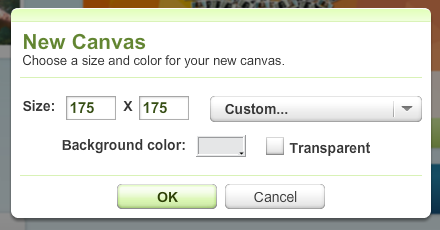
Blog Button Tutorial I have gotten a couple of requests to do a blog button tutorial, so here. //shoves tutorial in your face//   **Note: This tutorial was made for Windows, with Google Chrome and Blogger. You may not be able to follow this easily if you are using other platforms.    **Note: I will put up a tutorial using another platform, if requested. Making the Button First of all, you will need a picture to act as your blog button. Dont make it too big. I recommend 175 x 175 pixels , but you can go bigger than that. Just dont make it too big, otherwise itll look like your button swallowed everything in existence (webpage-wise). To make your picture, you can use programs like Photoshop , PicMonkey , etc. I used an online editor called Ribbet (which is basically Picnik 2.0, if youve ever heard of the program Picnik ). Its a little limited without the premium stuff, but it gets the job done.  I personally like the stickers that they have. What do you put on your bu...